
Computer inventory
Auto asset IDs (company–dept–category), specs, OS, warranty & maintenance dates, custom status labels, documents, notes, assignment audit trail, QR labels, and bulk CSV import.
Multi-tenant IT asset management for computers, accessories, licenses, employees, and support tickets — with department RBAC, QR tracking, REST API, and PDF/Excel/CSV reporting.
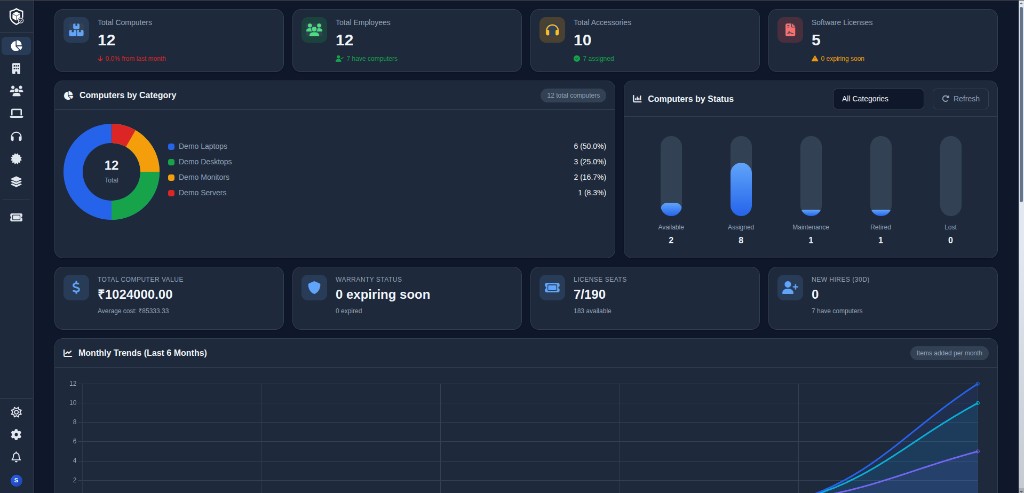
One platform for hardware, software, people, and support — built from a production Django codebase.
Auto asset IDs (company–dept–category), specs, OS, warranty & maintenance dates, custom status labels, documents, notes, assignment audit trail, QR labels, and bulk CSV import.
Categorize cables, docks, and peripherals; link to suppliers, locations, and departments; assign to employees with full checkout history.
Track publishers, license types, seat counts, and usage; assign to users or computers; record renewals; get expiry and low-seat alerts.
Companies, departments, and teams in one directory. Employment status controls login access; Google SSO via django-allauth.
Preset roles or granular RBAC per department — separate view, assign, edit, and delete rights for assets, accessories, licenses, and employees.
Employees raise tickets linked to computers; IT assigns, prioritizes, and resolves with internal comments. Status changes trigger notifications.
Dashboard plus asset, license, warranty, and financial reports. Custom report builder with saved configs. Export PDF, Excel, or CSV.
In-app and email alerts for asset assignments, license/warranty expiry, maintenance due, ticket updates, and more — with user preferences.
REST API v1 with API key auth for integrations. Export all data as a ZIP of CSVs; superusers can backup and restore the full database.
The live dashboard surfaces the metrics IT leaders actually track.
Computers, licenses, tickets & more
Subsidiaries & departments
Asset, license, warranty, financial
PDF, Excel, and CSV
From onboarding a new hire to preparing an audit — AssetKeeper covers the full desk.
Kit new hires with laptops, accessories, and software licenses in one flow. Auto asset IDs and assignment history from day one.
Track seat counts, assignments to users or devices, renewal history, and expiry alerts before renewals become emergencies.
Run asset value and financial reports, monitor warranty status, and export PDF or CSV packs for auditors and finance teams.
Employees raise tickets linked to their computer. IT assigns, prioritizes, comments, and resolves — with notifications at every step.
Designed for teams that outgrow spreadsheets but don't need enterprise bloat.
Manage inventory, assignments, QR labels, bulk imports, and maintenance schedules.
Maintain employee records, departments, and asset handoffs with clear ownership.
Track purchase costs, depreciation, license spend, and export audit-ready reports.
Scope data by company and department with granular RBAC per module.
Replace fragmented tools with one system your whole org can trust.
Connect AssetKeeper to the tools your team already uses.
From org setup to ongoing compliance — four steps reflected in the app.
Create companies, departments, and roles. Configure department permissions and optional Google SSO.
Bulk-upload computers via CSV templates or add manually. Define categories, suppliers, and locations.
Link hardware and licenses to employees or computers. Print QR labels; history and notifications follow every change.
Handle tickets, run warranty and financial reports, export data, and monitor expiry alerts from the dashboard.
AssetKeeper is a Django-based asset management system built for IT and operations teams that need more than a spreadsheet. It tracks computers from procurement through retirement with auto-generated asset IDs, warranty and maintenance schedules, QR labels, and full assignment history. Accessories, software licenses, employees, suppliers, and locations live in the same platform — scoped by company and department with granular permissions.
Growing IT teams lose visibility when inventory lives in spreadsheets: asset tags are inconsistent, license seats go untracked, warranty dates are missed, handoffs lack audit trails, and support requests sit outside the asset record.
AssetKeeper unifies hardware, software, people, and tickets in one multi-tenant platform. Department-level RBAC controls who can view or assign assets; notifications flag expiring licenses and warranties; reports export to PDF, Excel, or CSV; and a REST API with API key auth integrates with existing tools.
Quick answers before you book a demo.
IT and operations teams at growing companies that need structured asset tracking — computers, accessories, licenses, employees, and support tickets — without enterprise complexity.
Yes. AssetKeeper is multi-tenant with companies, departments, teams, and department-scoped RBAC so each unit sees only what they're allowed to.
Yes. The dashboard shows live stats and charts. You can run asset, license, warranty, and financial reports, build custom saved reports, and export to PDF, Excel, or CSV.
AssetKeeper exposes a REST API v1 for computers, accessories, licenses, employees, tickets, and notifications — authenticated via API keys.
Admins assign preset roles or granular permissions per department: separate view, assign, edit, and delete rights for assets, accessories, licenses, and employees.
We'll walk through the dashboard, a typical assign-and-track workflow, reporting exports, and answer questions about your org's setup. Request a demo via the contact form.
Book a demo to walk through the dashboard, assignment workflows, and reporting — tailored to your team.